Pogue Posse & Territory War (Montly) (Vorp&Rsg)

// SYSTEM DESCRIPTION
Pogue Posse & Territory War — Claim the Frontier, Paint the Map, Rule the Server 🤠⚔️
“Crews, colors and contested land.”
This script brings leadership competition, territory grabbing, and economic pressure to your RedM server. Create posses, pick colors, capture AI-held regions, declare wars on rivals, and paint the map with your banner.
📺 Info
 Video Preview: Watch the gameplay
❓ What is this?
Pogue Posse & Territory War is a full posse management + territory control system for RedM. Players create posses, pick name/color, pay upkeep, run quests to gain renown and XP, buy doctors and bodyguards — and then use all of that to fight for regions on the map.
When a region is captured, its blip on the map instantly switches to the winner’s posse color and starts generating hourly income. If the region is lost, income is cut off and renown is lost as a penalty.
⭐ Key Features
🪪 1. Item-Gated Access (Optional)
The script ships with 2 optional items: one legal, one illegal.
If you don’t want everyone to open the posse panel, you can gate it behind these items.
Item names and usage are fully configurable.
🧑🤝🧑 2. Posse Creation & Color Picking
If the player doesn’t have a posse, the panel shows a create posse screen.
Players can see existing posses and their colors.
They can choose a name and a color for their posse.
You can require money, items, or both for creation — all via config.
🗺️ 3. Map-Visible Territories
Created posses and their colors are reflected on the capturable territories.
Players can look at the map and instantly tell “which posse owns this area.”
🤖 4. AI-Owned World (at start)
On first install, all regions are owned by AI / NPC.
Players must first beat those NPCs to claim the region for their posse.
⚔️ 5. Territory War System
Only a posse leader or officer can declare war on a region.
And the posse must have enough renown to declare that war.
The war declaration is broadcast to other players, a prep/cooldown period starts,
Then the war becomes active and runs for the time you configured.
⏳ 6. Region Cooldown
If a region has just had a war, it goes into cooldown.
No one can declare war on it again until the cooldown ends.
Other posses can also attack a region you captured, under the same rules.
📊 7. Capture Bar Logic
The capture bar on the right side must be filled.
It fills only if:
there is no enemy alive inside the zone, and
you are alive inside the zone
If an enemy is alive in the zone, the bar pauses.
If you fill it before the timer ends, the region is yours.
🟦 8. Instant Blip Color Change
If you successfully capture the region you attacked, the blip on the map instantly switches to your posse color.
From that moment on, you start earning hourly income from that region.
If someone else takes it from you, the blip switches to their color, your income stops, and you lose renown.
🏥 9. Call Your Own Doctor to the Region
If you own a region, you can summon your posse doctor there.
Based on the doctor’s level, his revive cooldown gets shorter (from 5 minutes down to 1 minute).
Every upgrade increases posse upkeep.
🛡️ 10. NPC Bodyguards
From the posse shop, you can buy NPC guards for your posse.
With upgrades you can:
increase their count
increase their weapon tier
These guards attack anyone who is not a member of your posse.
These features are available only if you actually own a territory.
💰 11. Posse Bank & Upkeep
All players can deposit into the posse bank; only the leader can withdraw.
Posse expenses are automatically paid from this bank.
If a posse doesn’t pay upkeep for too long, it can be auto-disbanded.
This creates a natural “earn, or you won’t survive” loop.
📝 12. Quest Tab (Easy → Medium → Hard)
3 difficulty tiers of NPC combat missions.
Everyone who joins gets a per-player cash reward.
Missions give posse XP and renown.
Newly created posses only see easy; medium and hard can be unlocked from the posse shop.
🏛️ 13. Central Territory Option
You can designate one region as a central territory and make NPC defenders there much stronger.
You can boost HP, weapon tier, and accuracy to make it a prestige zone.
This gives players a real server-wide target to fight over.
⚙️ Configurable via Config
Framework selection (VORP & RSG)
Language
Item-gated access (legal/illegal, required items)
Posse creation cost (money / item / both / mode)
Posse upkeep interval and amount
Upkeep multipliers (level, quest board, doctor, guards)
Posse rank names and member limit
War start/end times (war window)
War duration (fight time, capture time)
Required renown to declare war
Region cooldown duration
Per-region rewards (money, everyHours)
Per-region war settings (min defenders, notifyAll)
Per-region AI settings (models, count, weapons, HP, accuracy)
Global War AI defaults
War HUD / PvP rules
Region income engine (tick, catch-up)
Quest system (spawn distance, routes, enemy blips)
Quest board shop levels (easy/medium/hard unlock)
Doctor shop levels (revive cooldown, required posse level)
Guard count shop levels
Guard weapon shop levels (weapon, HP, accuracy)
Doctor/guard NPC model and interact key
Territory marker models
Posse color list (blip modifiers)
🖥️ What Players See (UI)
Posse create / list screen
Color selection
Territory list with colors
War notifications and countdown
Bank screen (deposit for all, withdraw for leader)
Quest screen (easy/medium/hard)
Shop screen (doctor, guards, upgrades)
Toasts/messages for “war started / defended / captured / cooldown”
🧠 TL;DR
Create a posse
Pick your color
Clear AI-held territories
As leader/officer, declare war (with enough renown)
Fill the capture bar and take the region
Blip turns to your color
Earn hourly income
Pay upkeep or get disbanded
Take more regions for more power
Pogue Posse & Territory War turns your server into a living “who owns what?” map.
Pogue Posse & Territory War – Update v1.1.0
UI Translation Fixes
All known translation issues in the NUI have been fixed. Static labels, placeholders and dynamic texts now correctly use the i18n system, so both English and other languages stay consistent across the entire panel.Territory Blip Color / Owner Sync Fixed
An issue where territory blips were not always updating correctly when ownership changed has been addressed. Blip colors now reliably follow the current region owner, including after reconnects and ownership transfers.Invite Players Directly from Posse Management
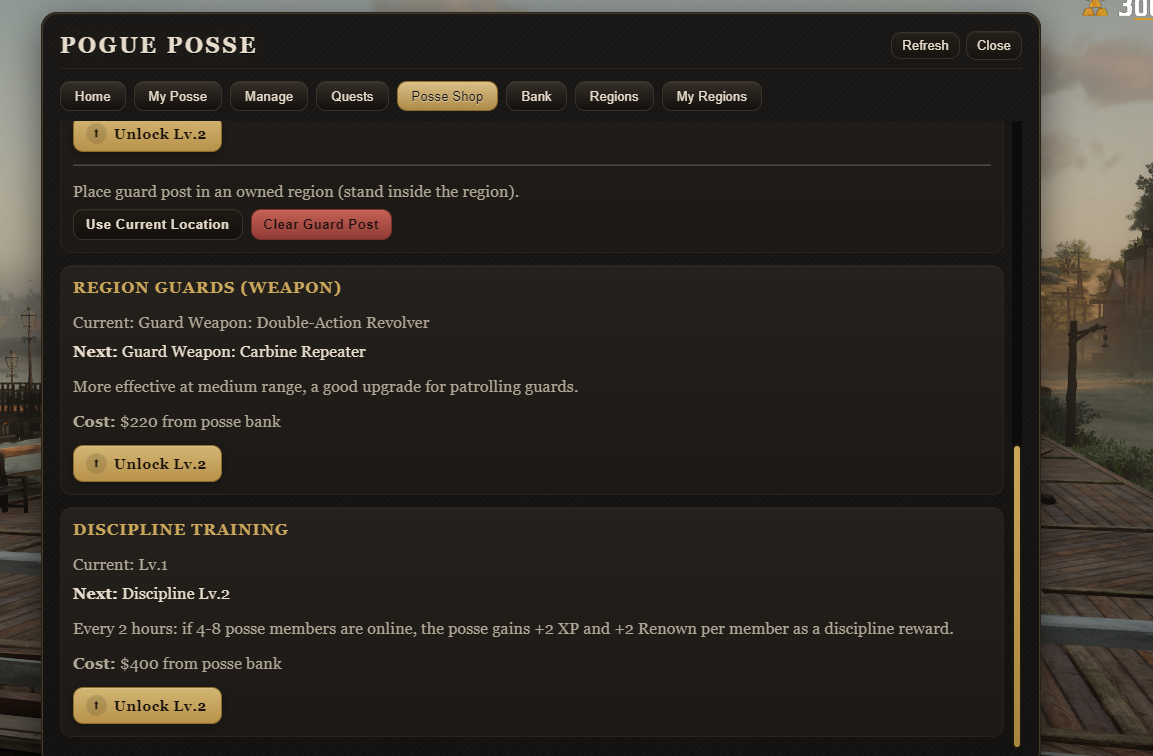
You can now add other players to your posse directly from the Manage tab (by source ID), without needing to use/possejoinanymore. This makes recruiting members much smoother, especially for admins and leaders managing large groups.New Posse Progression: Discipline Training
A new upgrade path called Discipline Training has been added to the Posse Shop.- Each level of Discipline represents how organized and drilled your posse is.
- During region wars and posse activities, disciplined posses gain extra renown and XP, scaling with the number of online posse members who are actively involved.
- Higher Discipline = more efficient growth for active posses, but also increases overall upkeep, so it’s a choice between safety and power.
Configurable Posse Shop Sections
All major Posse Shop categories (Quest Board, Doctor, Guards, Discipline, etc.) can now be toggled on/off from the config. If you don’t want a certain system on your server, you can simply disable its shop panel without touching the rest of the script.Territory War Notifications by Illegal Flag / Participants / Everyone
Territory war notifications (A posse declaring war, capturing a region, or defending it) can now be filtered by configuration:- Everyone – all players see war notifications.
- Only involved posses – only members of the attacker/defender posses see the messages.
- Illegal check only – only players flagged via the illegal item/flag system (when
IllegalCheck = true) see these notifications.
This lets you run fully public wars, faction-only wars, or “underground” wars visible only to illegal characters.
Optional Bank Log Deletion by Leader
Previously, only the posse leader could delete entries in the posse bank log. This behaviour is now configurable:- You can keep it as-is (leaders can delete logs),
- or disable log deletion entirely, making all bank logs permanent for better transparency/auditing on your server.
Territory War Days & War Window System (with AM/PM Support)
Territory wars now respect a flexible War Window system that you control from the config:- You can define multiple windows, each with its own days (
Sun, Mon, Tue, Wed, Thu, Fri, Sat) and start/stop time. - Both 24-hour format (
21:00) and AM/PM format (2:00 PM) are supported. - Windows can also cross midnight (for example,
20:00–02:00 AM), allowing late-night war periods. - Only during these active windows can region wars be started (according to your settings).
- The NUI Regions tab shows a translated “War window” line like:
Mon–Fri 17:00 - 23:59 • Sat–Sun 14:00 - 02:00 - Additionally, the system can show pre-start and before-end countdown warnings (in minutes) based on
notice_before_start_minandnotice_before_end_minin the config, and a small sticky timer card in the UI.
- You can define multiple windows, each with its own days (
Owner Colors in Regions & My Regions Tabs
In both the Regions and My Regions tabs, each territory now shows a colored dot next to its name that matches the owning posse’s color. This makes it much easier to read the map at a glance and instantly see which posse controls which territory directly from the UI.
 image
image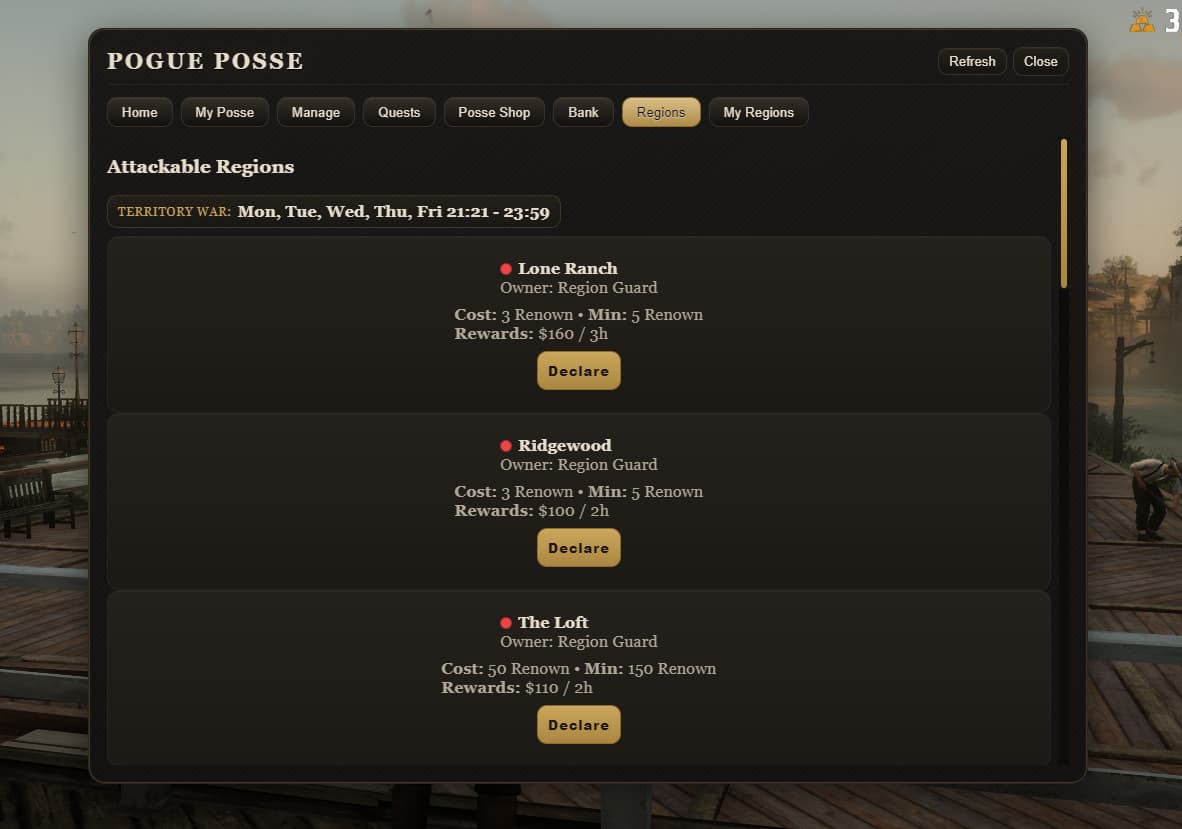 image3
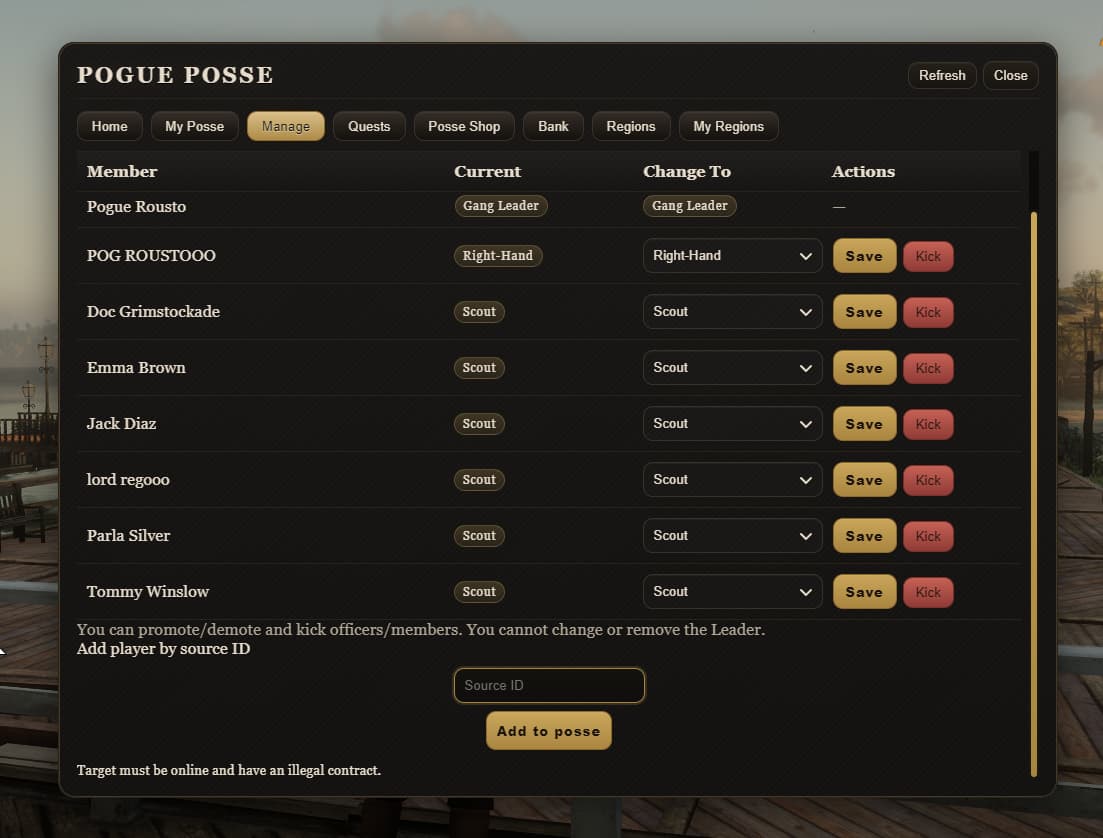 image2
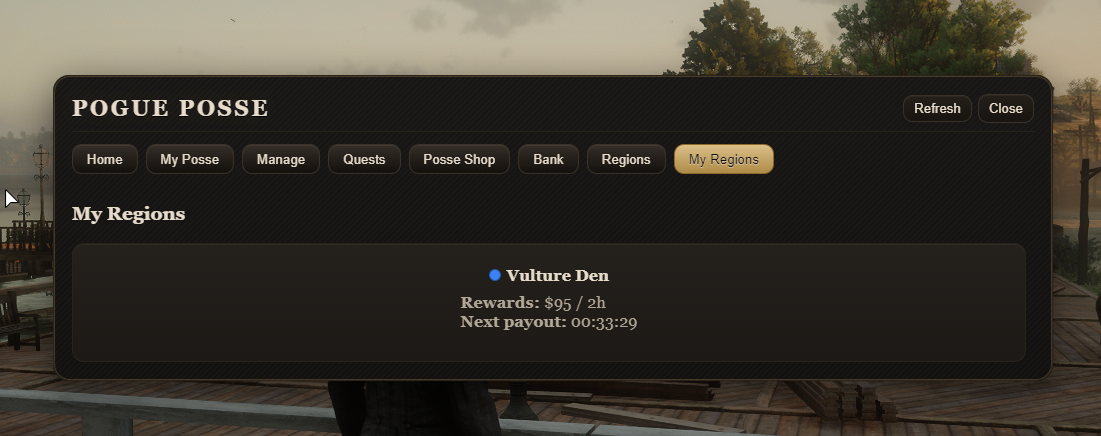 image4
Pogue Posse – Update 1.2.0
A focused quality-of-life update for both the UI and the bodyguard system.
 UI / Localization
- Upkeep timers are now properly localized instead of using a hard-coded
hsuffix. - The same time format is used consistently on the Create, My Posse, and Region Rewards sections.
 Bodyguard Improvements
- Fixed an issue where bodyguards did not correctly use their weapon level, causing incorrect loadouts.
- Fixed a bug where bodyguards could sometimes target their own posse members.
- Fixed a bug where multiple bodyguards could spawn for the same player by mistake; spawning is now properly limited and controlled.
Pogue Posse v1.3.0 – Update Notes
This update introduces an optional world-interaction method to open the Posse Panel.
Server owners can now place configurable “Posse NPC” NPCs in the world. Players can:
- See a map blip for the Posse NPC,
- Approach the NPC and get an on-screen prompt,
- Open the Posse Panel directly through that NPC.
The classic chat command access still works exactly as before, and you can choose to disable the command and use only NPC-based access if you prefer a more immersive RP experience.
Updated files in this version:
server.luaclient.luaconfig.luafxmanifest.lua
Pogue Posse v1.4.0 Update
We’ve released Pogue Posse v1.4.0 with 3 new features:
1) War Declaration Permission (Configurable)
You can now choose who is allowed to declare a war via config:
- Leader only
- Leader + Officer
- All members (Leader / Officer / Member)
2) “1 Posse = 1 War” Rule (Configurable)
New config options let you control war restrictions:
- If a posse is already in a war, you can decide whether they can declare another war or must be blocked.
- Same control for the defender/owner posse as well.
3) Posse Menu Access Modes (3 Options)
You can now control how the Posse Menu can be opened:
- Command only (e.g.
/posse) - NPC only
- NPC + Command (command works only inside Territories, plus NPC access)
Pogue Posse v1.5.0 — Update Notes
Posse Panel Access Improvements
- Added more flexible access rules for the Posse Panel.
- You can now choose whether players must own / stand inside their own region to open the panel.
- Introduced Posse Station locations (NPC/Prompts)with support for:
- Public stations: anyone can open the panel there
- Private stations: only usable under your region rules
- Added a proximity check to prevent fake/spoofed station interactions.
Panel Access Modes
You can now decide how the panel is opened:
- Command only
- NPC/Prompt only
- Hybrid option (NPC + limited command usage depending on region conditions)
War Start Reliability Update
- Added a short grace period after declaring a war so attackers have time to reach the region.
- This prevents wars from instantly ending if attacker presence updates a moment late.
Important
Please review the full config.lua carefully. New settings were added in this update, and some existing behaviors may change depending on your configuration.
Pogue Posse v1.6.0 — Update Notes
1) Region / Territory Blips Visibility
- Added a new option to control who can see region/territory blips on the map.
- You can now set it to Illegal-only, meaning only players with the illegal flag will see these blips.
2) Posse Quests — Kill/Progress Bug Fix
- Fixed an issue where kills sometimes didn’t count properly for posse quests after a quest was accepted.
- Quest progress tracking is now more reliable and consistent during fights.
3) Anti “Offline Raid” Protection
- Added a new rule that can block war declarations if the defending side doesn’t have enough players online.
- This is configurable per region (example: if set to
3, wars can’t be started unless at least 3 defenders are online — whether they are in the region or not).
Pogue Posse v1.7.0 Update
We have released the new Pogue Posse v1.7.0 update.
After receiving feedback that the random NPC spawn system we designed for convenience was not performing as well as expected, we moved to a different system and added several improvements.
Fixes and Improvements
- Reworked the quest NPC spawn system by assigning individual spawn locations for each NPC, preventing them from spawning underground.
- Quest NPC blips are now visible to all posse members who have accepted the quest.
- During battles against AI defenders in regions, enemy NPC blips can now be visible to posse members.
- AI defender spawn locations inside regions are now set individually for more stable and accurate spawning.
- Added a new war zone blip system for active region wars.
New War Zone Blip Options
When a region war is active, the war zone blip can now be configured as:
- visible only to posse vs posse participants
- visible only to illegal users
- visible to everyone
- or completely disabled