Pogue Telegram (RedM) (Vorp)

// SYSTEM DESCRIPTION
Telegram Script Overview (VORP Framework)
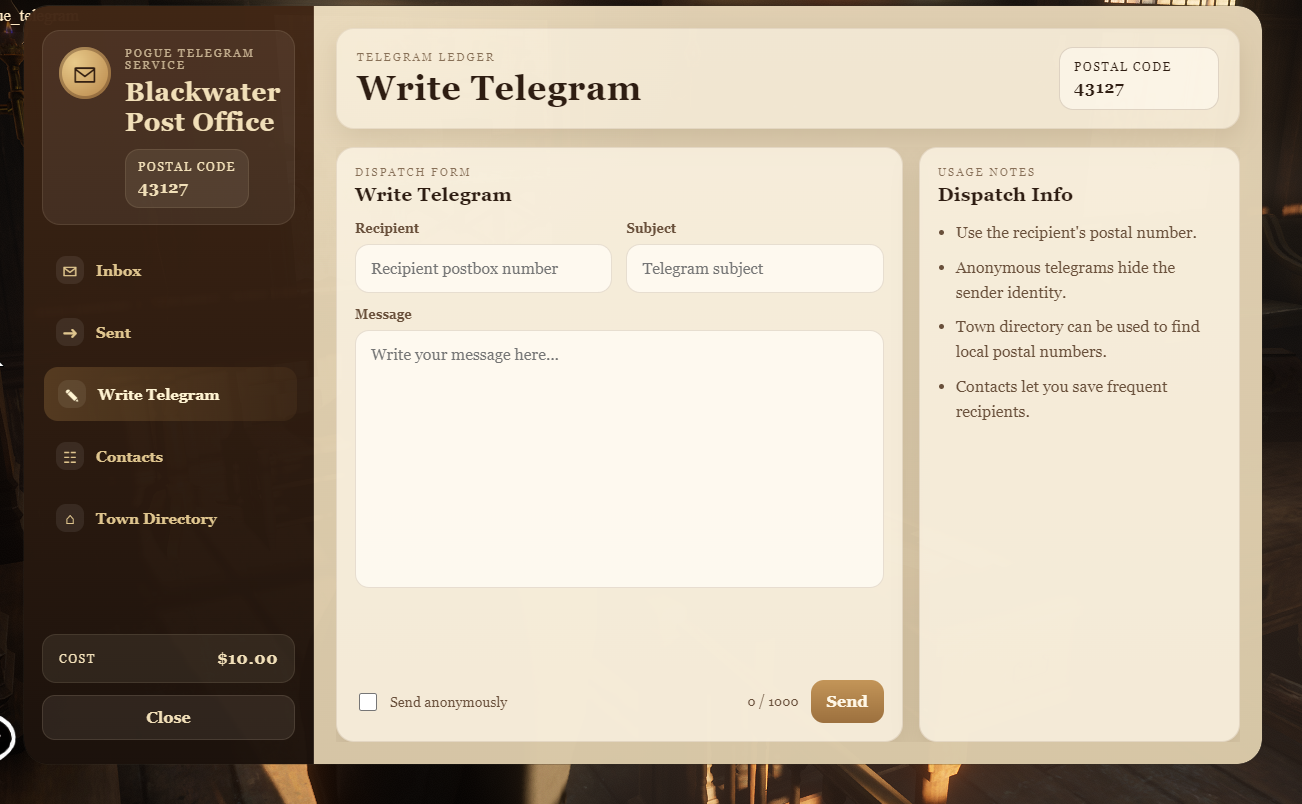
This script allows players in RedM to send and receive telegrams using the VORP Core Framework. It integrates with the game's UI, enabling players to create, view, delete, and manage telegrams and contacts. It simulates a post office system, providing players a way to communicate by sending messages to each other. Additionally, it includes multi-language support.
Key Features:
- Send and Create Telegrams: Players can create telegrams by entering the recipient’s postbox code, subject, and message.
- Inbox System: Each player has a personal inbox to receive telegrams.
- Postbox Assignment: Every player is assigned a unique postbox that others use to send telegrams.
- Contacts Management: Players can save postbox codes under custom names for quick access.
- Multi-language Support: The script includes dynamic language support, customizable via the config file.
- NPC Integration: Players can interact with NPCs to manage telegrams.
- Payment System: Sending telegrams costs in-game currency.
How the Script Works:
Player Postbox System: Each player is assigned a unique postbox code when they join the server for the first time. This postbox is stored in the database and used for receiving telegrams.
Creating a Telegram: Players interact with an NPC or press a designated key (default is "G") to open the telegram UI. They enter the recipient's postbox code, a subject, and a message, then send the telegram for a small in-game fee.
Receiving Telegrams: Players view received telegrams in their personal inbox. Once opened, telegrams are marked as read.
Managing Contacts: Players can save contacts with custom names and postbox codes for easier communication.
NPC Interaction: Players can interact with NPCs (e.g., post office clerks) to access the telegram system.
Configuration:
- Post Office Locations: Define NPC and post office locations in the config file.
- Payment for Telegrams: Configure the cost for sending telegrams.
- Multi-language Support: Define supported languages in the configuration file.
Usage Instructions:
Ensure the VORP Core Framework is installed and running.
Place the script in your server's resources directory.
Adjust the
config.luafile to match your post office locations and NPCs.Add the script to your server’s configuration file:
ensure pogue_telegramStart the resource using your server’s configuration file.
Dependencies:
- VORP Core Framework: The script requires VORP Core to function.
- SQL Database: Telegrams and contacts are stored in a SQL database.
Youtube Link: https://www.youtube.com/watch?v=fV54UrEBQJA
---UPDATES---
Pogue_Telegram v1.2.0 Update
With the new update, players can now check if they have unread telegrams by using the /command. For example, you can type /checkmail to find out if you have any unread telegrams.
Pogue_Telegram v1.3.0 Update
**  New Features: **
- Blip Customization: You can now enable or disable individual blips for each telegram office in the config.
Config.postoffice = {
    { name = "Valentine", blip = 1475382911, coords = vector3(-178.90, 626.71, 114.09), radius = 1.0 },
    { name = "Blackwater", blip = false, coords = vector3(-875.1723, -1328.7574, 43.9580), radius = 1.0 }, -- **Disable blip**
    { name = "Saint Denis", blip = 1475382911, coords = vector3(2736.3657, -1402.7230, 46.1831), radius = 1.0 },
    { name = "Rhodes", blip = false, coords = vector3(1225.5872, -1294.0364, 76.9091), radius = 1.0 }, -- **Disable blip**
    { name = "Strawberry", blip = 1475382911, coords = vector3(-1767.1658, -381.6003, 157.7319), radius = 1.0 }
}
Pogue_Telegram v1.4.0 Update
New Features:
- Direct Contact Selection: You can now click on a saved contact to automatically populate the recipient field in the telegram compose screen!
Pogue_Telegram v1.5.0 Update
 Unread Mail Icon Toggle
A new configuration option has been introduced:
Config.checkmailicon = true
When set to true, an unread.png icon will appear in the top-right corner of the screen to notify players of unread telegrams.
 Customizable Icon Appearance
You can change the position and appearance of the icon by editing this line in your ui.html:
<img id="unreadIcon" src="unread.png" style="display:none; position: fixed; top: 20px; right: 20px; width: 48px; height: 48px; z-index: 10000;" />
Adjust the position, size, or styling as needed.
Replace “unread.png” with any image you prefer for a custom look.
Pogue Telegram Update v2.0
A new major update is now available for Pogue Telegram.
Important Note
This update introduces new roleplay-focused telegram features, including anonymous telegram support, improved message handling, and better date display options for period-based servers.
What's Added
Anonymous Telegram System
Players can now send telegrams anonymously. When an anonymous telegram is received, the sender information will remain hidden from the recipient. This allows servers to create more immersive roleplay situations such as secret warnings, anonymous tips, threats, hidden messages, or confidential communication.
No Reply Option for Anonymous Telegrams
Anonymous telegrams can no longer be replied to. This prevents the sender’s telegram number or identity from being exposed accidentally and keeps anonymous communication fully protected.
Server Era Date Display
A new configuration option has been added for telegram date display. Servers can now choose to show telegram dates according to their own roleplay era. For example, if your server is set in 1895, telegram dates can be displayed as if they belong to that year. If this option is disabled, the system will continue using the normal real date display.
Why This Was Added
Better Roleplay Immersion
These changes were made to make telegram communication feel more natural, more useful, and more suitable for western roleplay servers. Anonymous telegrams allow players to create deeper stories, secret conflicts, investigations, threats, informant messages, and more realistic communication between characters.
Safer Anonymous Communication
The reply option has been removed from anonymous telegrams to make sure the sender’s identity stays hidden at all times.
General Improvements
Improved Telegram Flow
Telegram sending, reading, and message handling have been improved for a smoother experience.
Minor Fixes
A few small issues have also been fixed in this update to improve overall stability and usability.